I haven’t built AI search yet. But I already found what would have broken it.
While preparing to build RAG search for fieldnotes-ai.com, I audited 17 Field Notes and found 84 headings written as plain paragraphs. Claude Code fixed all via Contentful MCP.
I am midway through building a RAG-powered search for this site. Architecture is planned. Embedding model chosen. Supabase schema is ready to write.
Before running the indexing pipeline, I wanted to check one thing: are my Field Notes actually structured for retrieval?
Fourteen out of seventeen were not.
What I thought headings were for
Headings make text scannable. They break up long articles. They help readers navigate. They show up bigger on the page.
That is what I thought headings were for. Turns out they also determine how an AI search pipeline cuts up your content — and getting this wrong produces search results that feel broken even when every technical component is working correctly.
What chunking actually is
RAG search does not read your whole site when someone asks a question. It reads the most relevant slices of it. Those slices are called chunks.
The chunking strategy I planned for fieldnotes-ai.com is straightforward: split each Field Note at its H2 section headings. Each section becomes one chunk — the heading text plus the paragraphs that follow it. That chunk gets converted into a 512-dimensional vector and stored in Supabase. When a visitor searches, their question gets vectorized too, and the system finds the chunks with the closest semantic meaning.
The quality of those chunks determines everything. A precise chunk retrieves precisely. A vague chunk retrieves vaguely.
A heading in Rich Text is not a font size. It is a semantic boundary that tells the retrieval pipeline where one idea ends and another begins.
What I had instead
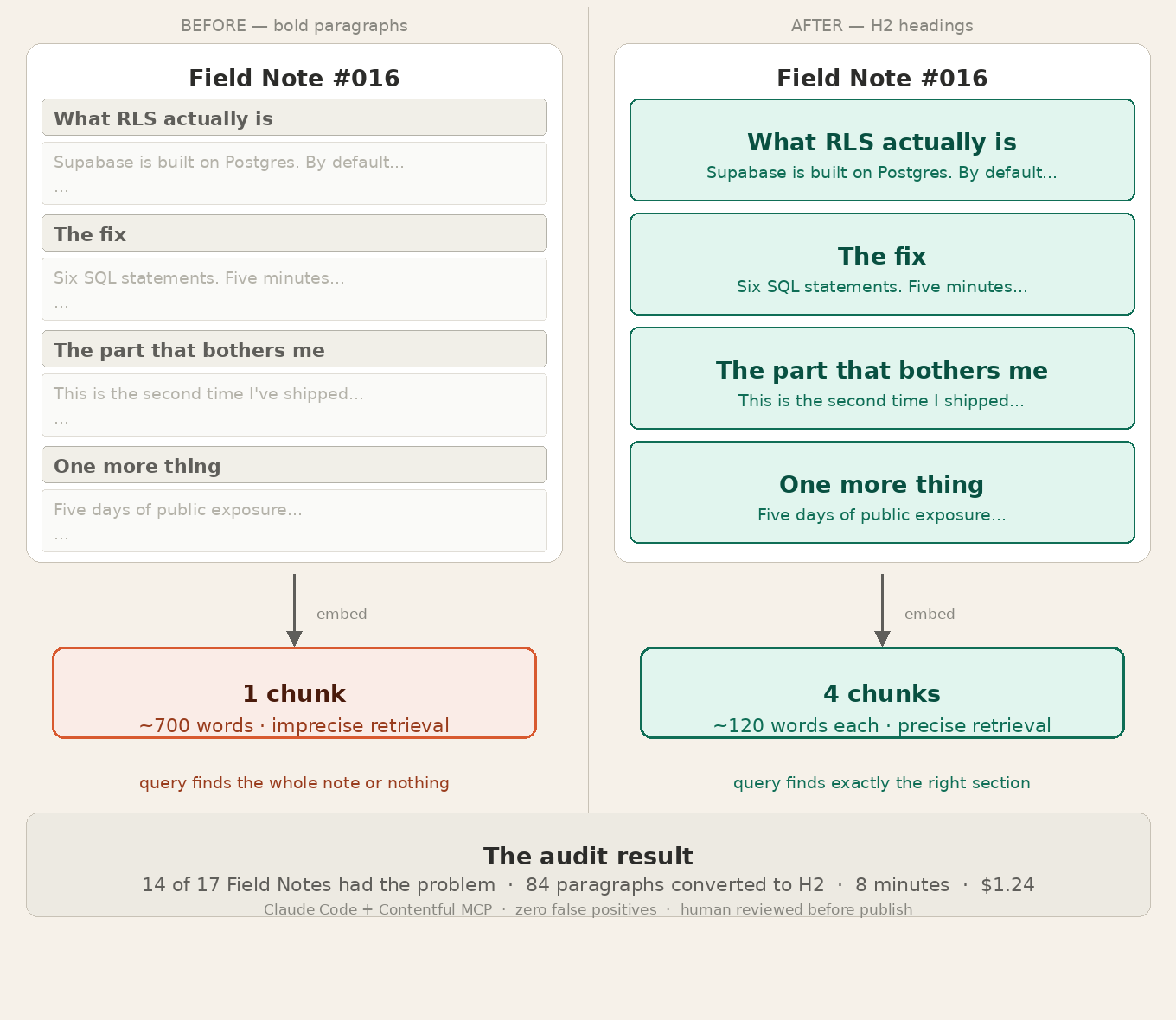
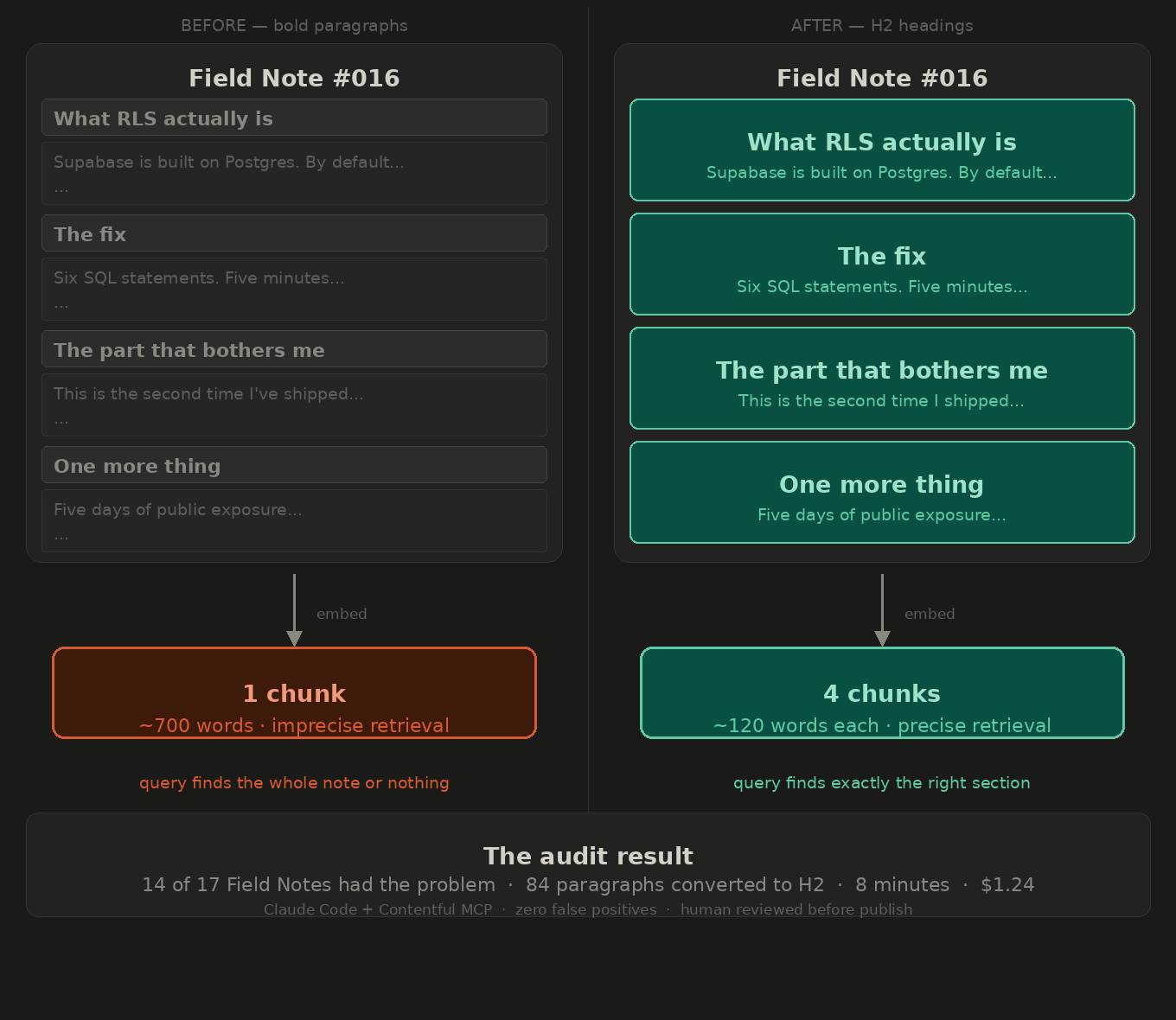
I had been writing Field Notes with bold paragraphs instead of H2 headings. On the page, they looked identical — same visual weight, same position in the layout. In the Contentful Rich Text JSON they are completely different node types.
A bold paragraph is decoration. A heading-2 is structure. The chunking script splits on structure. Decoration gets ignored.
Without proper headings, each Field Note would have become one giant chunk — 600 to 800 words of undifferentiated text. When someone searches “how did you handle the git token leak,” the system would retrieve the entire Field Note about the deployment that mentioned it once, buried in paragraph four.
That is not a search result. That is a document dump.
The audit
Rather than manually checking 17 entries, I asked Claude Code to do it via the Contentful MCP. It fetched every published Field Note, parsed the Rich Text body JSON node by node, and flagged any short non-punctuated paragraph sitting between longer prose blocks — the structural fingerprint of a heading written as a paragraph.
The result: 84 candidates across 14 entries. Every single one was a legitimate section header that should have been an H2. The detection had zero false positives.
Field Notes #5, #6, #7, and #17 were clean. Those happen to be the ones written after I started paying attention to structure. The first four notes had 7, 11, 10, and 7 issues respectively. Classic early-project debt compounding quietly while you ship.
The audit took 8 minutes and cost $1.24.
The fix
I reviewed the audit report, confirmed every flagged item, and gave Claude Code the approved list with exact entry IDs and node positions. It converted each paragraph node to a heading-2 node in the Rich Text JSON and saved every entry as a draft via the Contentful Management API. No auto-publishing — I reviewed each one in the Contentful editor and published manually.
After verifying the first two entries live on the site, I let the remaining 11 run in one pass. Total: 84 headings fixed across 13 entries in about 20 minutes of Claude Code work and 30 minutes of my review time.
The human-in-the-loop step was not just safety theatre. Watching the first two entries update correctly before trusting the rest is exactly the right instinct when you are writing programmatically to published content. Contentful keeps versions, so rollback is always possible — but checking before you need to rollback is better.
Why this matters before you build, not after
Finding this before running the indexing pipeline is significantly better than finding it after.
If I had indexed the corpus with broken structure and then wondered why search results were imprecise, I would have suspected the embedding model, the similarity threshold, the synthesis prompt, the chunk size parameter. I would have tuned things that did not need tuning. The real problem — a node type field in a JSON document — would have been invisible.
Content structure problems are hard to diagnose from search quality symptoms. They are easy to diagnose with a direct audit of the content itself.
Run the audit first. Fix the structure. Then build the search.
The enterprise version of this problem
At 17 pages, bad content structure is a fixable afternoon. At 1,000 enterprise pages, it is why your AI search initiative fails its first internal demo.
If 80% of your entries have the same problem — consistent with what I found here — that is 800 entries needing fixes. At five headings each, that is 4,000 manual editor clicks. No content team has that budget. An automated audit with human review via the CMS Management API is the only realistic path at scale.
The Contentful Management API makes this programmatically tractable. Every entry is structured JSON. Every Rich Text node has a type. Finding misused paragraph nodes and converting them to heading-2 nodes is a deterministic operation that scales to any corpus size.
The same principle applies to any headless CMS. Structured content means structured problems. Structured problems can be fixed systematically.
What comes next
The Field Notes are now properly structured for retrieval. Next session: write the Supabase schema, run the embedding pipeline, and actually build the search.
Field Note #019 will have the real numbers — what 17 notes chunked into sections actually looks like in a vector database, what the first search query returns, and whether all this preparation was worth it.